November 7, 2026 · Updated November 8, 2026 · 7 min read
How to turn an Instagram reel into a blog post
A reel can find you an audience. A blog post is what search engines and AI assistants can read and quote. Here is how to get from one to the other without inventing anything.
Since 10 July 2025, public posts and reels from professional Instagram accounts held by adults can appear in Google and Bing results, as PPC Land reported the day before the change. The setting is on by default for eligible accounts, under the name “Allow public photos and videos to appear in search engine results”.
Being indexed helps, but most of what a reel says is spoken. Until it is written down, there is little text on the page for a search engine to rank or for an assistant to quote. A blog post fixes that, and it lives on a site you own.
To turn a reel into a blog post, transcribe it, list the claims it makes, find a written source for each one, pick the angle the post will take, and write the post from the sources, using the reel as your starting point.
Which reels make good blog posts?
Reels that explain something, answer a question or make a claim about the world. A reel about a new rule for small shops or a common mistake in your trade will carry an article. A reel that is mostly a joke or a product shot will not, and there is no need to force it.
Why isn’t the transcript the blog post?
Speech and reading work differently. Spoken video tends to repeat itself, skip its sources and lean on what is on screen. In an r/Blogging thread about turning YouTube videos into blog posts, one reply called the transcript raw material, and another pointed out that a video is rarely as thorough as a post needs to be.
Use the transcript to find the claims, then source each one, which a reel rarely does.
How do you check what the reel says?
List every statement that could be true or false. For each one, find the page that states it, preferably the original study, rule or announcement, and confirm the sentence is on the page. Anything you cannot source stays out of the post, however confident the reel sounded.
The full checklist, step by step.
How to fact-check AI contentHow do you choose an angle?
Decide what the post is for before you write it. The same facts can make a news item that leads with what changed, a feature that explains how something works, an opinion piece that argues a position, a newsletter item or a thread. The facts stay the same. The angle decides which fact leads.
Where should you publish it?
On your own blog first, whether that is WordPress or Ghost. Technical reels suit DEV or Hashnode as well. A shorter version can go to LinkedIn, X or Threads, ideally with a different angle for each.
How does StrandScribe do this?
You share the reel with @strandscribe.bot in an Instagram direct message, or paste its link into the box above your briefs. Either way it lands in your inbox as a brief.
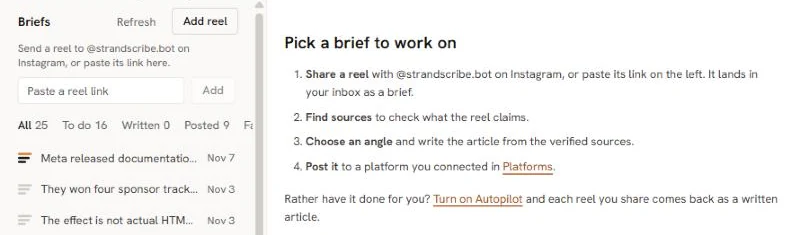
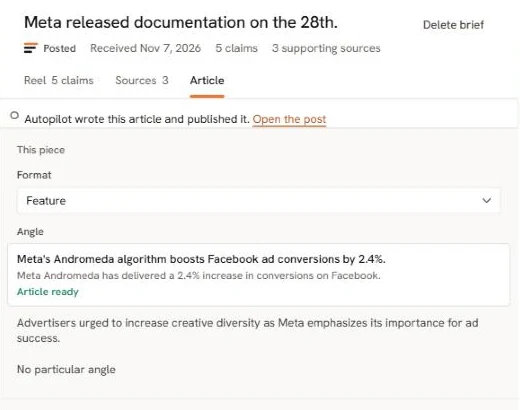
StrandScribe transcribes it and pulls out the checkable claims. It searches for each claim and reads every page, and keeps a source only when the passage is found word for word on that page. The reel itself is never cited.
It suggests a few angles and says why each fits. You pick one and a format, in the house style or your own voice, and get a draft written to number each factual sentence to its source. Edit it, add a title image, and post or schedule it to WordPress, Ghost, DEV, Hashnode, X, Threads or LinkedIn.
If the reel came from your own account, paste its address under With the post and the video appears at the top of the article, so readers see where it came from. It works with Instagram reels, YouTube Shorts and TikToks.
What does Autopilot do with a reel?
That depends on one setting with three choices. Wait for me turns the reel into a brief and stops there. Write it for me finds the sources and writes the article, then saves it as a private draft on the platform you pick. Write and publish puts the article live without you reading it first.
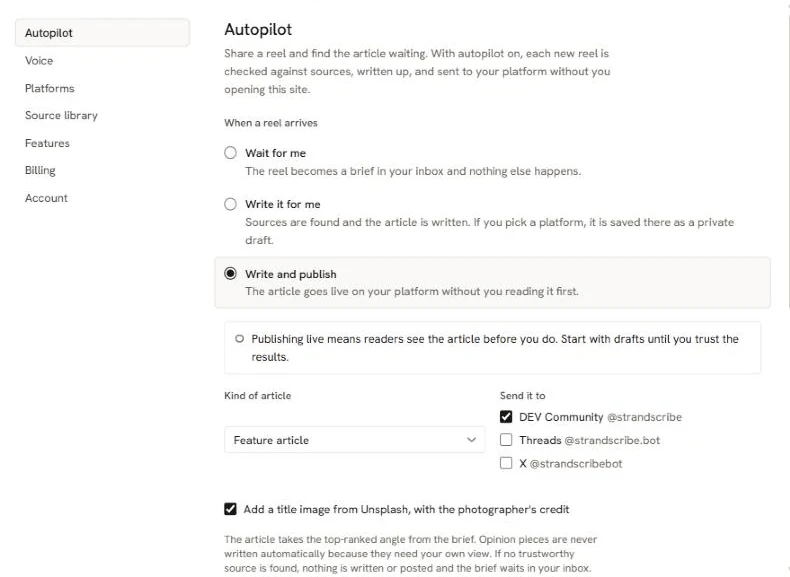
The settings page itself warns that publishing live means readers see the article before you do, and suggests drafts until you trust the results. Autopilot writes an evidence review, a news article or a feature from the top-ranked angle. It never writes an opinion piece on its own, because an opinion has to be yours. If no trustworthy source turns up, nothing is written or posted and the brief waits in your inbox.
Send the next reel you would have just liked.
Try it with your next reelIf you post a reel a week and blog never, this closes the gap and leaves you the review of each draft. Starter is €9 or $10 a month for 50 reels, Pro €29 or $30 for 250, Agency €199 or $200 for 2,000.
Plans are billed monthly and can be cancelled from your account.
See plans and pricingQuestions people ask
Does Google index Instagram reels?
Since 10 July 2025, public posts and reels from professional Instagram accounts held by adults can appear in Google and Bing results, with an opt-out setting. Reporting on the change came from trade press; check Instagram’s Help Center for the current terms.
Is the reel cited as a source in the article?
No. StrandScribe treats the reel as a lead. The article cites pages that were fetched and read, and only where the supporting passage was found word for word.
What happens to a claim in the reel that no source supports?
It is left out of the article. A point from the reel that no source supports does not appear in the draft.
Which article formats can a reel become?
Eight: a news article, an evidence review, a feature, an opinion piece, a newsletter issue, a LinkedIn post, a thread for X and a short caption. The sources stay the same; the format and angle change what leads.